Company Information
In the Company Information Folder on the left of the page, you’ll find General Information Page and Schedules.
General Information Page
This form is your company’s general information that carries over to each form. It will automatically populate, so that this information only needs to be saved once. This page has been designed for you to enter company specific information such as company name, address, telephone number, NAIC Code, Federal ID Number, officer names, signer names, preparer information, contact information, etc.
Schedules
The schedules under the Company Information folder include Input Schedule, Rate and Fee Schedule ,Address Schedule, and Login Schedule (if it’s applicable to the State).
Refer to View Schedules for different options to view the reports and schedules.
Input Schedule
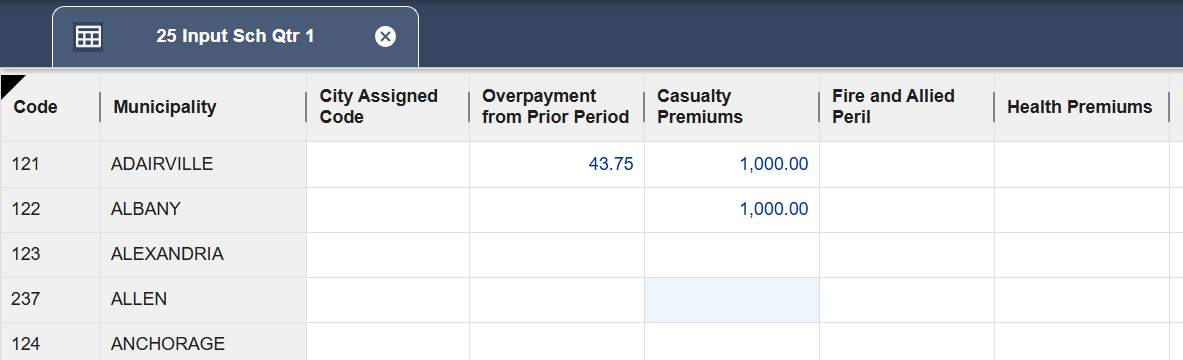
This schedule contains a list of taxable municipalities and municipal codes for the State Inputting a value in an input schedule will activate that jurisdiction return.
For Kentucky, the Input Schedule is separated by the quarter that is selected in the dropdown; when the return is activated, it is also activated in subsequent quarters and Annual Reconciliation. See the Kentucky Specifics page for more details on Kentucky filings.
Rate and Fee Schedule
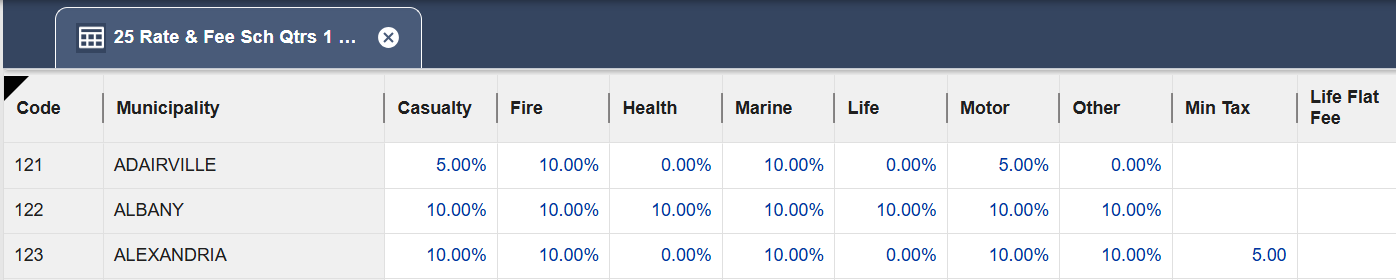
This schedule provides a listing of all applicable rates and/or fees for all municipalities . Any overrides made on this schedule will flow to or be used in the municipal calculation. However, overrides will not roll over to subsequent year rate schedules.
Address Schedule
This schedule contains the payee, mailing information, and contact information for the municipalities to which payment is due. Any overrides made on this schedule will flow to both the return and applicable payment requests.

Login Schedule
In Municipal, the Login Schedule provides a place for you to enter your company's usernames and passwords to some returns that can be filed online. The passwords are encrypted and are not displayed in plain text.
When you are ready to login the website, you can click on the icon under the Go column, the software will open the webpage and transfer the username and password to the corresponding fields on the website.
