Premium Pro Help
Archive Feature
Enterprise will display up to three years of tax data. Older tax years will be archived and saved in a separate location. An automatic Archive function will be released once a year following the tax season. When you initiate the update process from the Update Center, you will be prompted to archive the applicable tax years before you can proceed with the update.
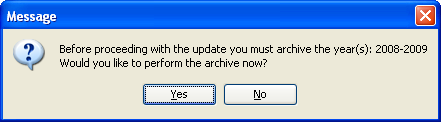
If you select Yes to archive, you will then be prompted to save the archive file. Browse to the desired location and make note of this for future reference. The software will then create a zip file that contains the necessary program and product files for the applicable archived tax years. Data will not be removed from the database during this process.
While speed will vary based on your network, in general it should take around 30 minutes to complete the Archive process. If it is taking considerably longer than that, verify that you are saving the file to a location that is on the same LAN where Enterprise is installed. Note that if you access the software using Citrix, it is recommended that the files are archived to a location on the Citrix server. Upon completion, you can move the zip file to the preferred location.
When archiving, an entry is made in the Actions Report including the location where the Archive file was saved.
If you need to access the archived versions of the software, locate the zip file you previously created during the archive process. Unzip the files to a new directory. A separate instance of Enterprise will then exist for the years included in the archive. Double-clicking on the Enterprise.exe in the new directory will load the applicable archived software. By default, the archived versions of Enterprise will access the database location that was in use when the automatic archive process occurred. If you have changed database servers since then, you will need to remove or rename the Enterprise.xml file in the new root directory. When you open the archived Enterprise version, you will be prompted to establish a database connection.
To assist with the recovery of previously archived tax years in Premium Pro Enterprise, there is an option on the help menu that will create a replacement file set. Help>Request Archive Replacement File
Our website address: www.tritechsoft.com
Our mailing address: 1205 S. Greenville Ave, Allen, TX 75002.
Questions? You can reach us at 1-800-380-6407
Or contact WebSupport here.
©1995-2015 TriTech Software Development Corp. ©2006-2015 TriTech Services Inc. All rights reserved. Premium Pro® is a registered trademark.